Posted on — 2 Comments

512GB Micro SD Card for 4K Video: What You Need to Know

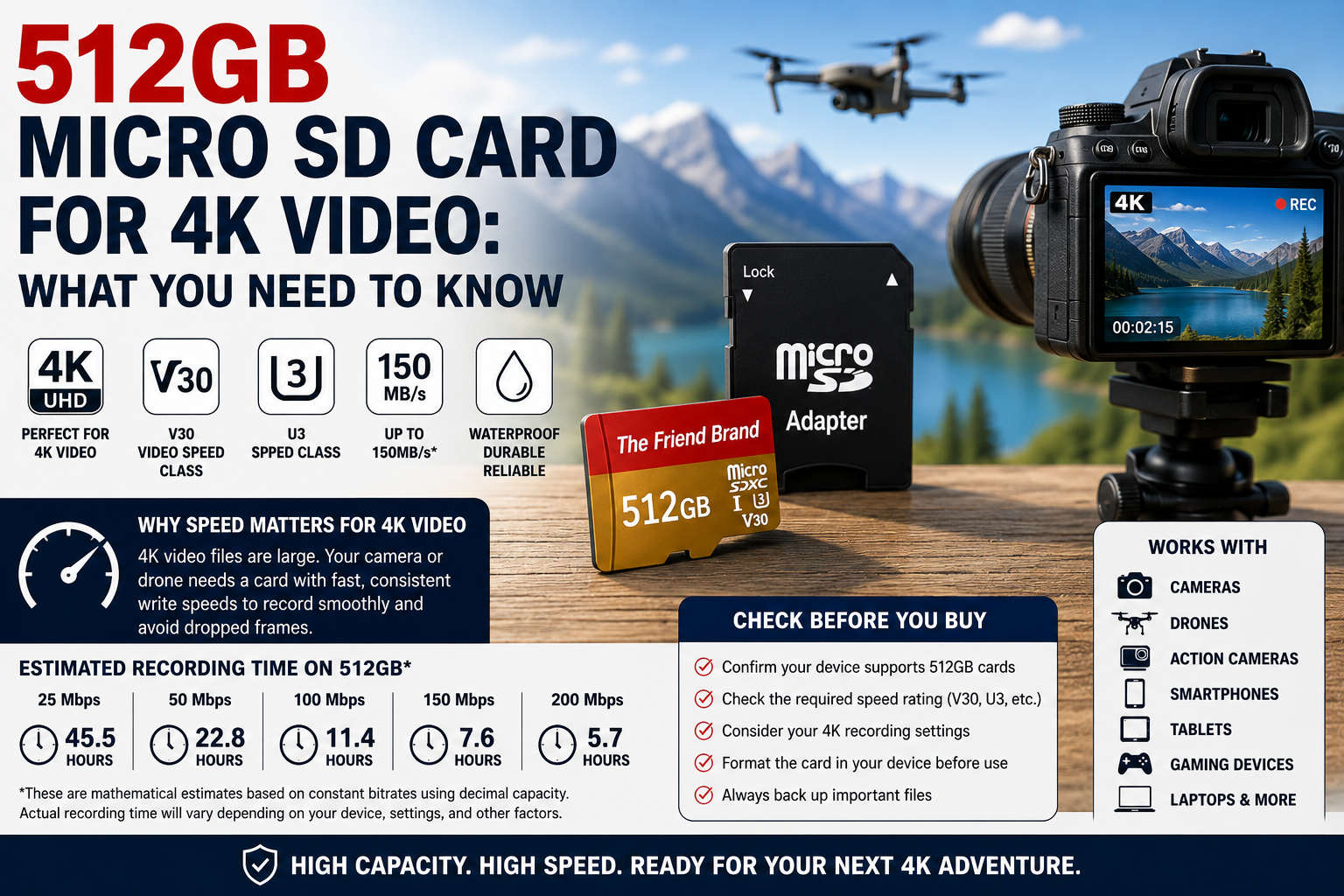
512GB micro SD card for 4K video with camera and drone

A 512GB micro SD card can be used for 4K video when the recording device supports 512GB cards and the card meets the speed requirements for the selected recording mode. Capacity alone does not determine whether a memory card is suitable for 4K recording.

Before choosing a 512GB micro SD card for 4K video, check the card’s V30, U3, Speed Class and interface specifications along with your camera’s required write speed, bitrate and maximum supported storage capacity. This guide explains what those specifications mean and approximately how much 4K video 512GB can hold.

Can You Use a 512GB Micro SD Card for 4K Video?

Yes, provided your recording device supports a 512GB card and the card meets the device manufacturer’s required speed and performance specifications for the 4K recording mode you plan to use.

The term 4K describes video resolution, but resolution alone does not determine how quickly a camera writes data to a memory card.

Two devices can both record 4K video while using very different bitrates, frame rates, codecs and compression settings. As a result, their micro SD card requirements can also be different.

What Speed Micro SD Card Do You Need for 4K Video?

The required speed depends on the recording device and the specific 4K recording mode.

When recording video, a camera continuously writes data to the memory card. If the card cannot sustain the write performance required by that recording mode, recording may not work properly.

For this reason, do not choose a card based only on its maximum advertised transfer speed. Check the minimum speed rating required by the manufacturer of your camera, drone, action camera or other recording device.

What Does V30 Mean on a Micro SD Card?

V30 is a Video Speed Class rating established by the SD Association.

V30 indicates a minimum sustained sequential write speed of 30 MB/s under the Video Speed Class specification.

The Video Speed Class ratings include:

  • V6: minimum 6 MB/s
  • V10: minimum 10 MB/s
  • V30: minimum 30 MB/s
  • V60: minimum 60 MB/s
  • V90: minimum 90 MB/s

A V30 rating does not automatically make a card suitable for every 4K recording mode. Some devices and recording settings may require higher performance.

Is V30 Good for 4K Video?

V30 can meet the requirements of some 4K recording modes because it specifies a minimum sustained sequential write speed of 30 MB/s. However, not every 4K camera or recording mode has the same requirements.

Check the specifications for your exact device and recording settings before assuming that V30 is sufficient.

What Does U3 Mean on a Micro SD Card?

U3 belongs to the UHS Speed Class system.

U3 indicates a minimum sequential write speed of 30 MB/s under the UHS Speed Class specification.

You may see both U3 and V30 printed on the same micro SD card. Although they belong to different classification systems, both specify a 30 MB/s minimum write-performance level within their respective standards.

What Does Class 10 Mean?

Class 10 is part of the original SD Speed Class system.

Class 10 indicates a minimum sequential write speed of 10 MB/s.

Modern micro SD cards may display several ratings at the same time, such as Class 10, U3 and V30. Each symbol represents a particular SD speed-class specification.

What Does UHS-I Mean?

UHS-I refers to the card’s Ultra High Speed bus interface.

UHS-I and U3 are not the same specification. UHS-I describes the bus interface, while U3 describes a minimum write-speed classification.

The host device also affects actual performance, so compatibility between the card and device remains important.

What Does “Up to 150MB/s” Mean on a Micro SD Card?

Some micro SD cards advertise transfer speeds using language such as up to 150MB/s.

The phrase up to indicates a maximum advertised transfer speed under applicable conditions. It should not be interpreted as a guaranteed sustained write speed in every device or recording situation.

Actual performance can vary based on factors including:

  • The host device
  • The card reader
  • The interface
  • Read versus write operations
  • File sizes
  • Recording mode
  • Formatting
  • Other hardware and operating conditions

How Many Hours of Video Can 512GB Hold?

The amount of 4K video that fits on a 512GB micro SD card depends primarily on the recording bitrate, along with factors such as frame rate, codec, compression, audio settings and the recording device.

There is therefore no single recording-time figure that applies to every 4K camera. However, bitrate can be used to calculate useful theoretical estimates.

512GB at 50 Mbps

A 50 megabit-per-second recording uses approximately:

50 ÷ 8 = 6.25 megabytes per second.

Over one hour:

6.25 × 3,600 = 22,500MB per hour.

Using 512,000MB as a simplified decimal representation of 512GB:

512,000 ÷ 22,500 ≈ 22.8 hours.

Therefore, 512GB theoretically represents about 22.8 hours of video at a constant 50 Mbps before accounting for formatting, usable-capacity differences, file-system overhead, variable bitrate and other factors.

512GB at 100 Mbps

At 100 Mbps:

100 ÷ 8 = 12.5MB per second.

12.5 × 3,600 = 45,000MB per hour.

512,000 ÷ 45,000 ≈ 11.4 hours.

That produces a theoretical estimate of approximately 11.4 hours at a constant 100 Mbps before accounting for real-world storage overhead and other variables.

512GB 4K Video Recording Time by Bitrate

Using simplified mathematical estimates, a 512GB card represents approximately:

  • 25 Mbps: 45.5 hours
  • 50 Mbps: 22.8 hours
  • 100 Mbps: 11.4 hours
  • 150 Mbps: 7.6 hours
  • 200 Mbps: 5.7 hours

These are theoretical estimates, not guaranteed recording times. Actual usable capacity is lower than the advertised 512GB, and recording devices may use variable bitrates, create additional files or reserve storage for other purposes.

Will a 512GB Micro SD Card Work in Every 4K Camera?

No. A 512GB micro SD card will not necessarily work in every 4K camera.

Before purchasing a card, check the official specifications for your exact camera model and confirm:

  • Maximum supported card capacity
  • Supported card type
  • Required file system or formatting procedure
  • Minimum speed rating
  • Requirements for your chosen 4K recording mode
  • Any additional memory-card recommendations from the manufacturer

A card that meets the requirements for one camera’s 4K mode is not automatically appropriate for another camera.

Using a 512GB Micro SD Card in a Drone

Drones can have specific memory-card requirements, particularly when recording high-resolution or high-frame-rate video.

Check the drone manufacturer’s official specifications before choosing a card. Some drones may limit maximum card capacity or require particular speed ratings for specific recording modes.

Using a 512GB Micro SD Card in an Action Camera

Action cameras frequently record high-resolution video for extended periods, making both storage capacity and sustained write performance important.

Verify that your particular action camera supports 512GB cards and check the recommended Video Speed Class or other card requirements for the recording settings you intend to use.

Can You Record 4K Video to a Micro SD Card in a Smartphone or Tablet?

Some smartphones and tablets support expandable micro SD storage, while others do not include a micro SD card slot.

Even when a device supports removable storage, its camera application or operating system may limit whether 4K video can be recorded directly to the memory card.

Check your device manufacturer’s documentation before relying on a micro SD card for 4K recording.

Should You Format a 512GB Micro SD Card Before Recording 4K Video?

Many cameras and recording devices provide a built-in memory-card formatting function.

If the manufacturer recommends formatting the card in the recording device before use, follow that procedure. This helps prepare the card according to the requirements of the device that will use it.

Formatting erases existing data. Always back up files you want to keep before formatting a memory card.

For detailed formatting instructions, see our guide on How to Format a 512GB Micro SD Card.

Choosing a 512GB Micro SD Card for 4K Video

When choosing a micro SD card for 4K video, do not make the decision based on capacity alone. Confirm that the recording device supports 512GB cards and that the card meets the speed requirements for the recording mode you intend to use.

If your device supports the applicable specifications, The Friend Brand offers a 1-Pack 512GB Micro SD Card with Adapter and a 2-Pack 512GB Micro SD Cards.

Review the product specifications and compare them with the requirements published by the manufacturer of your recording device before purchasing or recording important footage.

Frequently Asked Questions About 512GB Micro SD Cards for 4K Video

Is a 512GB micro SD card good for 4K video?

A 512GB micro SD card can provide substantial storage for 4K video, but the device must support that capacity and the card must meet the speed requirements of the selected recording mode.

Is V30 good for 4K video?

V30 specifies a minimum sustained sequential write speed of 30 MB/s. That can meet the requirements of some 4K recording modes, but you should verify the requirements established by the manufacturer of your exact recording device.

Is U3 suitable for 4K video?

U3 specifies a minimum sequential write speed of 30 MB/s under the UHS Speed Class system. Some 4K devices specify U3 as a requirement, but requirements vary by device and recording mode.

How many hours of 4K video can 512GB hold?

It depends on bitrate and other recording settings. Using simplified calculations, 512GB represents about 22.8 hours at 50 Mbps, 11.4 hours at 100 Mbps, 7.6 hours at 150 Mbps or 5.7 hours at 200 Mbps before accounting for usable-capacity differences, overhead and other variables.

Will a 512GB micro SD card work in every 4K camera?

No. Cameras have different maximum-capacity, card-type, speed and formatting requirements. Always check the specifications for your exact camera model.

Is advertised maximum speed the same as sustained write speed?

No. A maximum advertised transfer speed and a minimum sustained write-speed classification describe different performance characteristics. For video recording, pay particular attention to the minimum requirements specified by the recording-device manufacturer.

Should I format a new micro SD card before recording 4K video?

Follow the instructions provided by the manufacturer of your recording device. If the manufacturer recommends formatting the card in the camera or device before recording, use that procedure and remember that formatting erases existing data.

Final Thoughts

A 512GB micro SD card for 4K video can provide substantial recording capacity, but capacity is only one part of choosing the right memory card.

Check your device’s maximum supported capacity, required speed rating, recording bitrate and formatting requirements. Ratings such as V30 and U3 provide useful performance information, but the specifications for your exact recording device should determine which card you use.

If your device supports the applicable specifications, compare The Friend Brand’s 1-Pack 512GB Micro SD Card and 2-Pack 512GB Micro SD Cards to choose the package that fits your storage needs.
Posted on — 3 Comments

How to Format a 512GB Micro SD Card

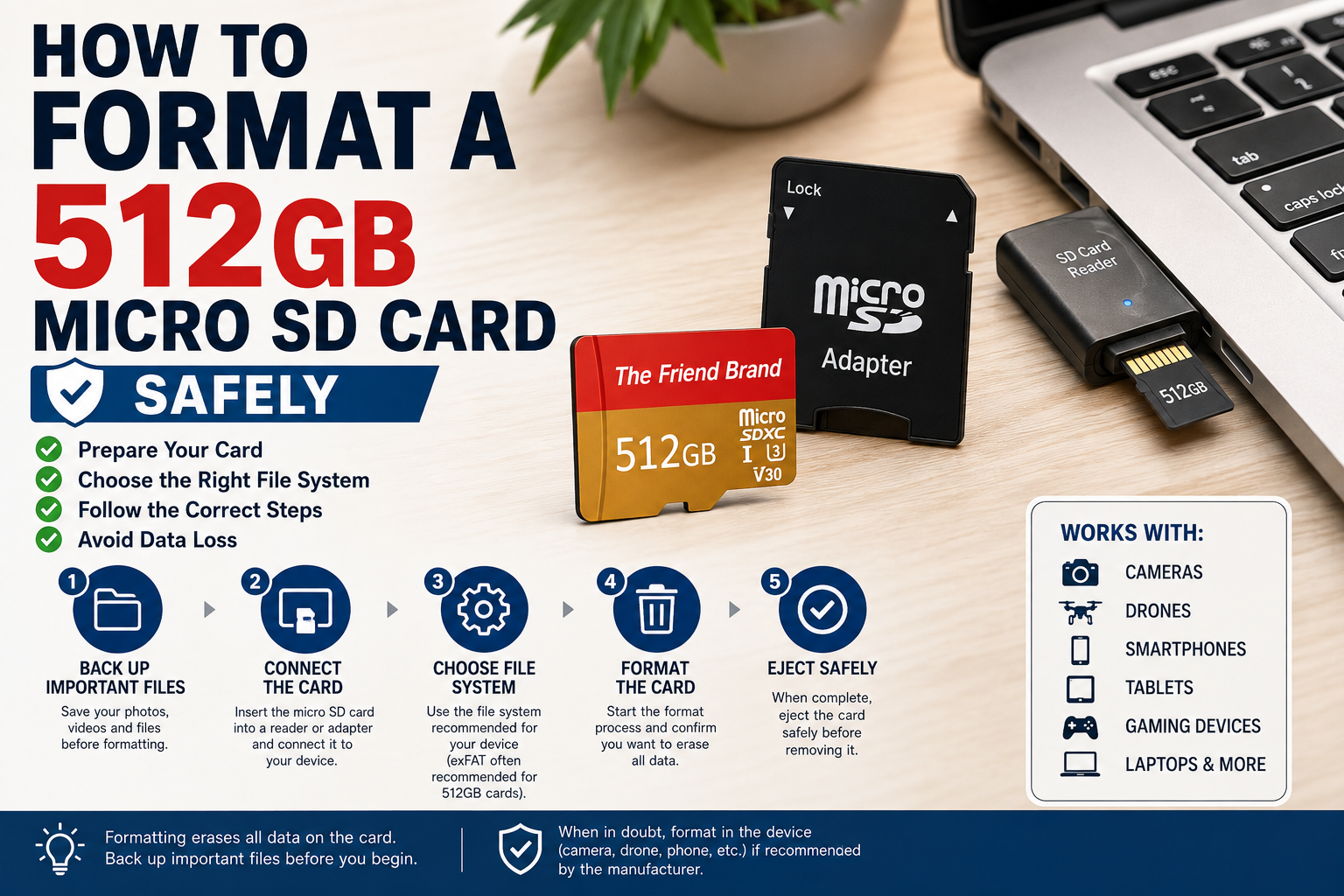
How to format a 512GB micro SD card safely

Formatting a 512GB micro SD card prepares it for use with a compatible camera, computer, smartphone, tablet, gaming device, or other electronic device. Before formatting, back up any files you want to keep because formatting erases the data on the card.

This guide explains how to format a 512GB micro SD card safely, including how to format it in Windows, how to choose the correct file system, whether to use Quick Format or Restore Device Defaults, and what to do if the card is not recognized. The correct settings can vary by device, so always check the requirements of the device that will use the card.

What Does Formatting a Micro SD Card Do?

Formatting prepares a storage device with a file system that allows a compatible device to organize, read, and write data.

Important: Formatting erases the data on the card. Back up any photos, videos, documents, or other files you want to keep before proceeding.

Before You Format a 512GB Micro SD Card

Before formatting, check the following:

  • Back up any files you need to keep.
  • Verify that your device supports a 512GB micro SD card.
  • Check the device manufacturer’s recommended file system and formatting procedure.
  • Make sure your computer or card reader properly recognizes the card.
  • If using an SD adapter, make sure its physical lock switch is not in the locked position.

Device compatibility is particularly important. Not every device that accepts a micro SD card necessarily supports every capacity.

What File System Should You Use for a 512GB Micro SD Card?

The correct file system depends on the requirements of the device that will use the card.

High-capacity SDXC memory cards are commonly associated with the exFAT file system, but you should not change the file system simply because a card has a particular capacity. Follow the requirements of your specific host device.

If a camera, gaming system, or other device provides its own formatting function, its manufacturer may recommend formatting the card directly in that device.

How to Format a 512GB Micro SD Card

If your device manufacturer permits formatting the card using a Windows computer, the basic process is:

  1. Insert the micro SD card into a compatible card reader or SD adapter.
  2. Connect it to your Windows computer.
  3. Open File Explorer.
  4. Select This PC.
  5. Locate the micro SD card under your drives.
  6. Carefully verify that you have selected the correct drive.
  7. Right-click the card and choose Format.
  8. Select the file system required by the device that will use the card.
  9. Choose the appropriate formatting option.
  10. Click Start.
  11. Read the Windows warning confirming that formatting will erase the card.
  12. Proceed only after confirming that the correct drive is selected and your important files are backed up.

When formatting finishes, safely eject the card before removing it.

Quick Format or Full Format?

For most routine formatting in Windows, Quick Format is the faster option, while a full format performs additional checking and takes considerably longer. The right choice depends on why you are formatting the card and the requirements of the device that will use it.

A quick format prepares the file system without performing the same level of disk scanning performed by a full format, so it generally completes much faster.

Whether you should use quick format or another formatting procedure depends on why you are formatting the card and the recommendations for your device.

For a card that will be used in a camera, drone, gaming system, or another specialized device, follow that manufacturer’s instructions rather than assuming the Windows default is appropriate.

Should You Use “Restore Device Defaults” When Formatting a 512GB Micro SD Card?

Windows may display a Restore device defaults button in the Format window.

This restores the formatting selections Windows considers appropriate for that storage device. It does not guarantee that those settings are the settings required by every camera, phone, tablet, gaming system, or other device.

Check the requirements of the device that will actually use the card before formatting.

Formatting a Micro SD Card in a Camera

Many camera manufacturers recommend formatting memory cards using the camera’s own formatting function.

The exact menu varies by manufacturer and model, but it is often found under a setup or storage menu.

Before selecting Format:

  • Confirm that all important photos and videos have been backed up.
  • Make sure the battery has sufficient charge or connect the camera to an appropriate power source if recommended.
  • Confirm that the camera supports the card’s capacity and specifications.

Follow the instructions in the camera’s official manual for your exact model.

Formatting a Micro SD Card in a Smartphone or Tablet

If your phone or tablet supports expandable micro SD storage, it may provide a formatting option within its storage settings.

The exact procedure varies by operating system, manufacturer, and device model.

Do not format the card using generic instructions if your device manufacturer provides a specific procedure. Follow the official instructions for your device.

Formatting a Card for a Drone or Action Camera

Drones and action cameras can have specific requirements for memory-card capacity, speed, and formatting.

For these devices, it is particularly important to consult the manufacturer’s documentation before formatting or recording important footage.

If the device provides a built-in formatting function, use the procedure recommended by its manufacturer.

Why Doesn’t My Computer Show the Full 512GB?

A card sold as 512GB will normally display less than 512GB in some operating-system interfaces.

One reason is that storage manufacturers generally advertise capacity using decimal units, while some operating systems calculate or display storage using binary-based measurements. Formatting and file-system structures can also consume some space.

This difference alone does not necessarily indicate that storage is missing.

What If the Micro SD Card Isn’t Recognized?

If the card does not appear on your computer or device, do not immediately format it—especially if it contains files you need.

First check:

  • Whether the card is inserted correctly.
  • Whether the adapter is inserted correctly.
  • Whether the adapter’s lock switch is in the correct position.
  • Whether the card reader supports the card.
  • Whether the host device supports 512GB cards.
  • Whether another compatible reader or device recognizes it.

If important data is already on the card, avoid unnecessary formatting or write operations until you have determined whether the files can be recovered or backed up.

How Often Should You Format a Micro SD Card?

There is no universal schedule requiring every micro SD card to be formatted after a particular number of days or uses.

Follow the recommendations for the device in which the card is being used. Some camera manufacturers, for example, may recommend periodically formatting cards in the camera after files have been safely transferred and backed up.

Never Rely on One Memory Card as Your Only Backup

Formatting mistakes are only one way files can be lost. Memory cards can also be damaged, misplaced, corrupted, or fail.

Important photos, videos, documents, and other files should be stored in another appropriate backup location as well.

Choosing a 512GB Micro SD Card

If your device supports 512GB removable storage, The Friend Brand offers both a 1-Pack 512GB Micro SD Card with Adapter and a 2-Pack 512GB Micro SD Cards.

Check the specifications and confirm compatibility with your particular device before purchasing or formatting a card.

Frequently Asked Questions

Does formatting a micro SD card delete everything?

Formatting erases the card’s file-system information and makes its existing contents unavailable through normal use. Treat formatting as destructive and back up anything important beforehand.

Should I use exFAT for a 512GB micro SD card?

SDXC cards are commonly formatted with exFAT, but the correct choice ultimately depends on the requirements of the device using the card. Check the manufacturer’s documentation before changing the file system.

Should I use Quick Format?

Quick Format is faster than a full Windows format, but whether it is appropriate depends on your situation and device. Follow the instructions supplied by the manufacturer of the device that will use the card.

Should I format my card on my computer or in my camera?

If your camera manufacturer recommends formatting cards in the camera, use the camera’s built-in formatting function. Follow the official instructions for your exact model.

Can I format a card that already has photos on it?

You can, but formatting will erase access to the existing files. Transfer and verify your backups before formatting if you want to keep those photos.

Final Thoughts

Formatting a 512GB micro SD card is usually straightforward, but the safest method is to start with the requirements of the device that will use it.

Back up your files, confirm compatibility, select the correct drive, use the file system recommended for your device, and never interrupt the formatting process unnecessarily.

Taking a few minutes to verify these details can help you avoid accidentally erasing the wrong storage device or preparing the card in a format your device does not support.

Posted on — 1 Comment

How to Choose the Right Micro SD Card for Your Device

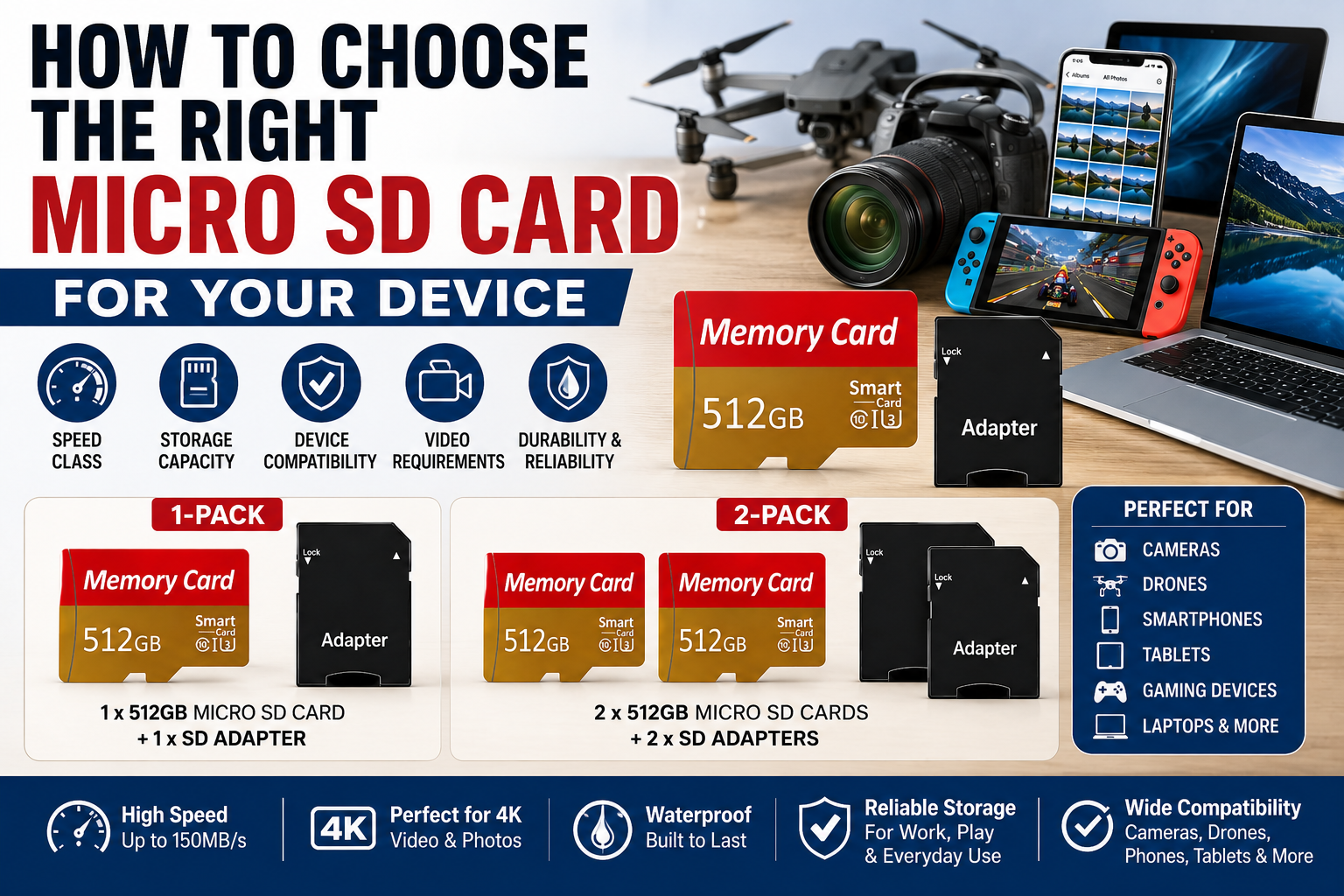
How to choose the right micro SD card for your device

Choosing the right micro SD card means matching the card to your device and the way you plan to use it. Storage capacity matters, but speed ratings, device compatibility, video requirements, and supported card formats can be just as important.

If you are wondering how to select the right memory card for your use, start by identifying what your device supports and what you plan to store or record. A card used mainly for photos or documents may have different requirements from one used for 4K video, drones, gaming devices, or continuous recording.

This guide explains how to choose the right micro SD card for your device, including capacity, physical card size, Class 10, U1 and U3 ratings, V30, UHS-I, read and write speeds, device compatibility, and formatting.

1. Check Whether Your Device Supports Micro SD Cards

Before comparing storage capacities or speed ratings, confirm that your device actually supports micro SD cards.

Some smartphones, tablets, laptops, cameras, drones, gaming systems, security cameras, and other electronics include a micro SD card slot. However, others may use full-size SD cards, internal storage, proprietary memory, or no removable storage at all.

For the most reliable information, check the device manufacturer’s manual, specifications, or support information for your exact model.

2. Do SD Cards Come in Different Sizes?

Yes. SD memory cards come in different physical formats. Two commonly encountered formats are full-size SD cards and smaller micro SD cards.

A micro SD card is designed for devices with a micro SD card slot. A full-size SD card is physically larger and is commonly used in compatible cameras, computers, and card readers.

A micro SD card can also be placed into a compatible full-size SD adapter. The adapter changes the physical form of the card so it can fit into a standard SD slot; it does not increase the card’s storage capacity or change its underlying specifications.

Because the physical dimensions and supported card formats differ, always confirm which type of memory card your device accepts before purchasing one.

3. Choose the Right Micro SD Card Capacity

Micro SD cards are available in many storage capacities. The right amount depends on how much data you plan to store and the maximum capacity supported by your device.

Common uses can include:

  • Photos
  • Videos
  • 4K video recordings
  • Music
  • Documents
  • Games
  • Apps and compatible application data
  • Camera and drone footage

A larger-capacity card can reduce how often you need to transfer or delete files. However, your device must support that capacity.

For example, a 512GB micro SD card offers a large amount of storage, but you should first confirm that your device supports 512GB cards.

4. What Does Class 10 Mean?

Class 10 is a speed-class rating used on SD and micro SD cards.

A Class 10 rating indicates a minimum sequential write speed of 10 MB/s under the applicable speed-class standard.

Because many modern applications involve larger files and video recording, Class 10 is commonly seen on current micro SD cards. Even so, additional speed ratings such as U1, U3, or V30 may be more useful when evaluating a card for demanding recording applications.

5. What Do U1 and U3 Mean?

The UHS Speed Class system includes ratings such as U1 and U3.

  • U1 indicates a minimum sustained write speed of 10 MB/s.
  • U3 indicates a minimum sustained write speed of 30 MB/s.

As a result, U3 cards are commonly considered for applications that require higher sustained write performance, including certain high-resolution video recording situations.

However, always compare the card’s rating with the specific requirements of your device.

6. What Does V30 Mean?

V30 is part of the Video Speed Class system.

A V30-rated card is designed to maintain at least 30 MB/s of sequential write performance under the Video Speed Class specification.

This can be important for devices that continuously write large amounts of video data to the card.

If you plan to record 4K video, check the camera or device manufacturer’s recommended card specifications rather than choosing a card based only on capacity.

For more information about storage and speed requirements for 4K recording, read our guide to 512GB Micro SD Cards for 4K Video.

7. What Does UHS-I Mean?

UHS-I refers to an Ultra High Speed bus interface used by many SD and micro SD cards.

The interface affects how the card communicates with compatible devices. Nevertheless, the presence of UHS-I by itself does not tell you the card’s exact sustained write speed.

For that reason, look at the complete group of specifications rather than relying on one label alone.

A card may display several markings at the same time, such as Class 10, U3, V30, and UHS-I.

8. Understand Read Speed vs. Write Speed

Read speed and write speed describe different types of performance.

Read speed relates to how quickly data can be read from the card. This can affect tasks such as opening files or transferring data from the card to another device.

Write speed relates to how quickly information can be written onto the card. This is particularly important when recording video, taking bursts of photos, or saving continuous data.

Therefore, a large advertised maximum read-speed number does not automatically mean the card can sustain the write speed required by your camera or other recording device.

9. How to Choose a Micro SD Card for a Camera

When choosing a micro SD card for a camera, start by checking the camera manufacturer’s supported capacity and speed requirements.

Consider factors such as:

  • Maximum supported card capacity
  • Photo resolution
  • Video resolution
  • Video bitrate
  • Required speed class
  • Continuous or burst shooting requirements

If the camera records high-resolution or high-bitrate video, sustained write performance becomes especially important.

In addition, some cameras may recommend specific card types or speed ratings in the user manual.

10. How to Choose a Micro SD Card for a Drone

Drones can generate large video files, especially when recording in high resolution.

Before buying a card, confirm the drone’s:

  • Maximum supported storage capacity
  • Recommended speed class
  • Supported card format
  • Maximum video resolution and bitrate

A large-capacity card may allow longer recording sessions. However, capacity will not help if the card’s sustained write speed does not meet the drone’s recording requirements.

11. How to Choose a Micro SD Card for a Smartphone or Tablet

Some smartphones and tablets support expandable storage through a micro SD card slot.

If your device supports micro SD storage, first check the maximum supported capacity. Then consider what you plan to store.

For example, a larger card may be useful for:

  • Photos
  • Videos
  • Music
  • Downloaded media
  • Documents
  • Other compatible files

However, app-storage support varies by device and operating system. Therefore, do not assume every app or type of data can be moved to the card.

12. How to Choose a Micro SD Card for Gaming Devices

Some handheld gaming systems and other gaming devices support micro SD cards for additional storage.

When choosing a card, check the manufacturer’s stated storage limits and supported card standards.

Capacity can be particularly important when storing large digital games. At the same time, compatibility should come before simply choosing the largest card available.

13. Do You Need an SD Card Adapter?

A micro SD card adapter allows a micro SD card to fit into a standard full-size SD card slot.

This can be useful with compatible:

  • Laptops
  • Desktop card readers
  • Cameras
  • Printers
  • Other devices with full-size SD slots

The adapter does not increase the storage capacity of the micro SD card. Instead, it changes the physical form so the card can fit into a compatible SD slot.

14. Should You Buy One Micro SD Card or Two?

Whether you need one card or multiple cards depends on how you use your devices.

A single high-capacity card may be convenient if you primarily use one compatible device.

On the other hand, having two cards can provide additional flexibility. For example, you may want one card for a camera and another for a drone, or you may prefer to rotate cards while transferring files.

Some users also prefer keeping a separate card available rather than relying on only one storage device.

15. Format the Card for the Device That Will Use It

After choosing a compatible card, you may need to format it before use.

Formatting prepares the card’s file system for storage. However, formatting also erases the data currently stored on the card, so always back up important files first.

Whenever possible, follow the device manufacturer’s instructions for formatting removable storage.

For Windows instructions and additional formatting information, see our guide on How to Format a 512GB Micro SD Card.

16. Back Up Important Files

A micro SD card can provide convenient portable storage, but important files should not exist in only one place.

For valuable photos, videos, documents, or other files, consider maintaining another copy on a computer, external storage device, or appropriate backup service.

That way, one damaged, lost, or corrupted storage device does not automatically mean the only copy of your files is gone.

Quick Micro SD Card Buying Checklist

Before buying a micro SD card, compare the card specifications with the requirements of your device.

  • Confirm that your device supports micro SD cards
  • Check the maximum supported storage capacity
  • Determine whether you need Class 10, U1, U3, V30, or another speed rating
  • Verify whether your device supports UHS-I
  • Consider how much storage you actually need
  • Review the manufacturer’s recommendations for your exact device model

For cameras, drones, and other recording devices, also pay close attention to sustained write-speed requirements rather than relying only on the maximum advertised read speed.

Choosing a 512GB Micro SD Card

If your device supports 512GB storage, a 512GB micro SD card can provide substantial room for photos, video, music, documents, games, and other compatible files.

The Friend Brand offers a 512GB Micro SD Card with Adapter rated Class 10, UHS-I, U3, and V30 for compatible devices.

If you need more than one card, you can also view the 2-Pack 512GB Micro SD Cards.

As always, verify that your specific device supports the card capacity and required speed specifications before purchasing or using the card.

Frequently Asked Questions About Choosing a Micro SD Card

How do I select the right memory card for my use?

Start by checking which card type, storage capacity, and speed ratings your device supports. Then consider how you plan to use the card, such as storing photos and documents, recording video, gaming, or using it in a camera or drone. Match both the card’s capacity and performance specifications to your device and intended use.

How do I know which micro SD card I need?

Start with your device manufacturer’s specifications. Confirm the supported card type, maximum capacity, required speed class, and any additional recommendations for your intended use.

What size micro SD card should I buy?

The appropriate capacity depends on your device’s maximum supported storage and how much data you plan to keep on the card. Larger cards can hold more files, but the device must support the capacity you choose.

Do SD cards come in different sizes?

Yes. Full-size SD cards and micro SD cards have different physical dimensions. Make sure you choose the format that fits your device. A compatible SD adapter can allow a micro SD card to fit into a full-size SD card slot.

How can I tell what class an SD card is?

Look at the symbols and markings printed on the card or its packaging. Depending on the card, these may include a Class rating such as Class 10, a UHS Speed Class such as U1 or U3, or a Video Speed Class such as V30. Check the manufacturer’s specifications if the markings are unclear.

Is a larger micro SD card always better?

No. A larger card provides more storage, but compatibility and performance requirements still matter. A card that exceeds your device’s supported capacity may not work properly.

Is Class 10 good for a micro SD card?

Class 10 indicates a minimum sequential write speed of 10 MB/s under the Class 10 specification. However, more demanding uses may also require ratings such as U3 or V30.

What is the difference between U1 and U3?

U1 indicates a minimum sustained write speed of 10 MB/s, while U3 indicates a minimum sustained write speed of 30 MB/s under the UHS Speed Class specification.

What is V30 on a micro SD card?

V30 is a Video Speed Class rating indicating a minimum sustained sequential write speed of 30 MB/s under that specification.

Do I need V30 for 4K video?

Some 4K recording devices recommend or require V30 or another specific speed rating, while others may have different requirements. Therefore, check the manufacturer’s specifications for your exact camera, drone, phone, or other recording device.

Can I use a 512GB micro SD card in any device?

No. The device must support 512GB micro SD cards. Always check the maximum supported capacity before purchasing a high-capacity card.

Does a faster micro SD card make every device faster?

Not necessarily. Performance depends on the card, device, interface, workload, and other factors. A faster-rated card cannot make a device exceed its own hardware or interface limitations.

What is the difference between read speed and write speed?

Read speed describes how quickly data can be retrieved from the card, while write speed describes how quickly new data can be saved to it. Recording applications often depend heavily on sustained write performance.

Should I format a new micro SD card before using it?

That depends on the device and how the card is supplied. Some devices may prompt you to format the card, while others may accept the existing file system. Follow the manufacturer’s instructions for your specific device.

How to Select the Right Memory Card for Your Use

Knowing how to choose the right micro SD card comes down to matching the card to your device and intended use.

First, confirm compatibility, physical card format, and maximum supported capacity. Next, compare speed ratings such as Class 10, U1, U3, and V30 with the requirements of your device. Finally, consider how much storage you need and whether features such as an SD adapter are useful for your setup.

If your compatible device supports 512GB storage, explore The Friend Brand’s 512GB Micro SD Card with Adapter or the 2-Pack 512GB Micro SD Cards.

Posted on — Leave a comment

What Can You Store on a 512GB Micro SD Card? A Practical Guide

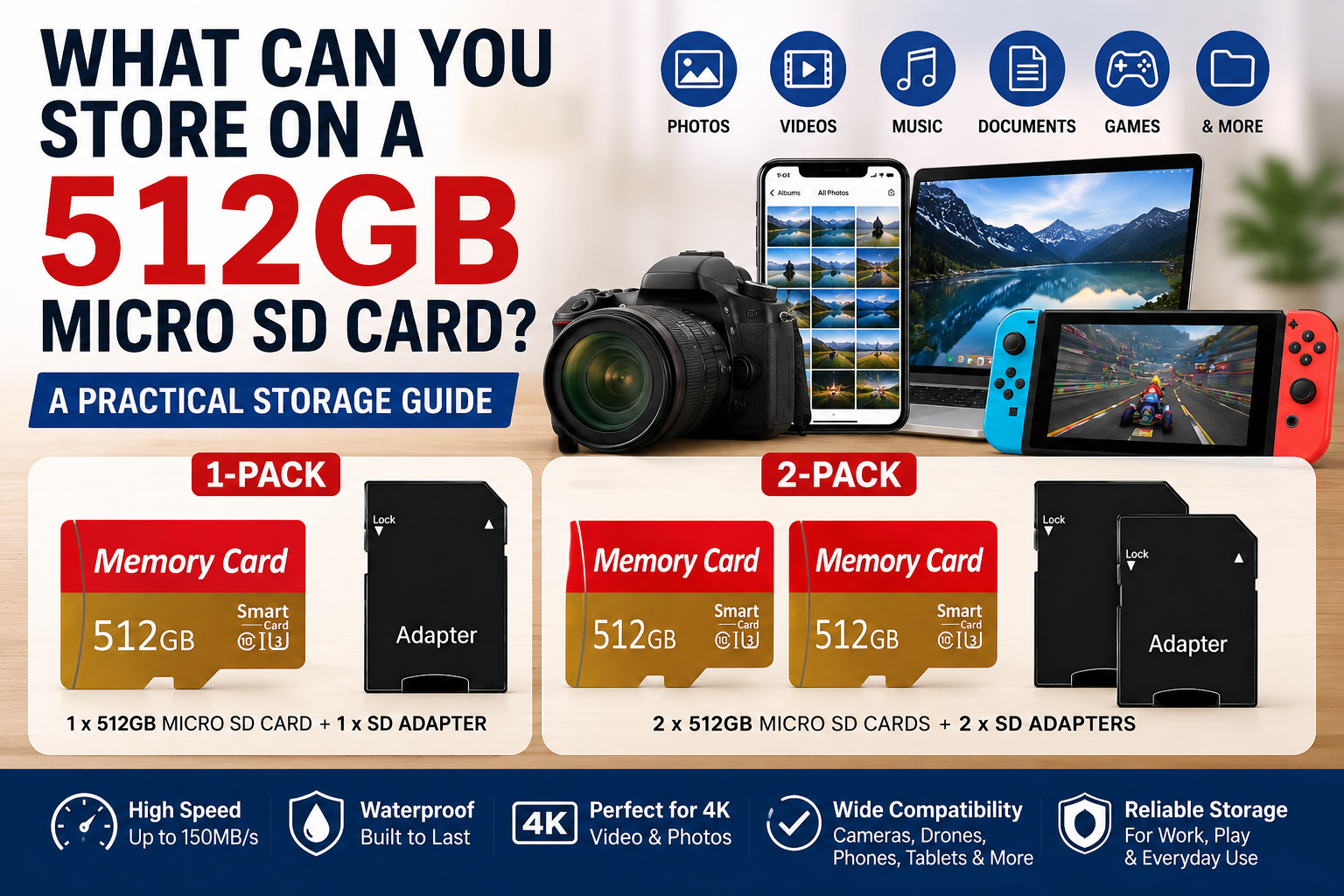
512GB micro SD card storage guide with 1-pack and 2-pack options

A 512GB micro SD card provides a large amount of portable storage in a very small format. Depending on the device and the types of files you use, 512GB can hold thousands of photos, many hours of video, large music collections, documents, game data, and other digital files.

So, what can you store on a 512GB micro SD card? The answer depends on file size, image resolution, video bitrate, compression, recording settings, and the device creating the files.

This guide explains how much data 512GB can hold, including practical estimates for photos, video, music, documents, and other common file types.

How Much Storage Is 512GB?

A memory card advertised as 512GB will not normally display exactly 512GB of usable storage after formatting.

Storage manufacturers generally advertise capacity using decimal units, while some operating systems calculate or display storage differently. Formatting and file-system structures also use a small amount of space.

This is normal for digital storage devices.

How Many Photos Can a 512GB Micro SD Card Hold?

If you are wondering how many photos or pictures 512GB can hold, the answer depends primarily on the average file size of each image.

Using 512,000MB as a simplified decimal representation of 512GB:

  • 5MB per photo: approximately 102,400 photos
  • 10MB per photo: approximately 51,200 photos
  • 20MB per photo: approximately 25,600 photos
  • 25MB per photo: approximately 20,480 photos
  • 50MB per photo: approximately 10,240 photos

These are mathematical estimates rather than guaranteed capacities. High-resolution photos, RAW images, burst photography, editing data, and different compression settings can significantly change the amount of storage required per photo.

How Long Does 512GB Last?

There is no single amount of time that 512GB will last because storage capacity is consumed according to the type and size of the files being saved.

For photos and documents, 512GB may hold thousands or even tens of thousands of files. For video recording, the amount of recording time depends heavily on bitrate, resolution, frame rate, codec, and compression.

For example, using simplified video calculations, 512GB represents approximately 22.8 hours at 50 Mbps, 11.4 hours at 100 Mbps, or 5.7 hours at 200 Mbps before accounting for real-world storage overhead.

How long a 512GB card lasts in everyday use therefore depends on how quickly your particular device creates and stores data.

How Much Video Can a 512GB Micro SD Card Hold?

Video storage requirements vary considerably because resolution alone does not determine file size.

Bitrate, frame rate, codec, compression, audio settings, and the recording device can all affect how much space a video uses.

Using simplified calculations, 512GB represents approximately:

  • 25 Mbps: 45.5 hours
  • 50 Mbps: 22.8 hours
  • 100 Mbps: 11.4 hours
  • 150 Mbps: 7.6 hours
  • 200 Mbps: 5.7 hours

These figures are theoretical estimates. Actual recording time will usually be lower because of usable-capacity differences, file-system overhead, variable bitrate, additional files, and other recording conditions.

How Much 4K Video Can 512GB Hold?

There is no single number of hours that applies to every 4K recording.

Two cameras can both record in 4K while producing very different file sizes because they may use different bitrates, frame rates, codecs, and compression methods.

For example, a 512GB card theoretically represents approximately 11.4 hours at a constant 100 Mbps or about 5.7 hours at a constant 200 Mbps before accounting for real-world storage overhead.

If you are choosing storage specifically for 4K recording, see our detailed guide to 512GB Micro SD Cards for 4K Video.

How Much Music Can a 512GB Micro SD Card Hold?

The number of songs that fit on 512GB depends on the audio format, bitrate, song length, and whether the files use compressed or lossless audio.

Using simple file-size examples:

  • 5MB per song: approximately 102,400 songs
  • 10MB per song: approximately 51,200 songs
  • 20MB per song: approximately 25,600 songs
  • 50MB per song: approximately 10,240 songs

Compressed audio files may use only a few megabytes per song, while lossless or high-resolution audio can require substantially more space.

How Many Documents Can 512GB Hold?

A 512GB micro SD card can hold a very large number of documents because files such as text documents, PDFs, spreadsheets, and presentations are often much smaller than photos and videos.

For example:

  • 1MB files: approximately 512,000 files
  • 5MB files: approximately 102,400 files
  • 10MB files: approximately 51,200 files
  • 100MB files: approximately 5,120 files

Actual file sizes vary widely, especially for documents containing high-resolution images, video, or other embedded media.

Can You Store Games on a 512GB Micro SD Card?

Some gaming devices support micro SD cards for downloadable games and other data.

How many games fit on 512GB depends on the size of each game. Smaller titles may use only a few gigabytes, while large games can require tens of gigabytes or more.

Always check the storage and micro SD compatibility requirements for your specific gaming device before purchasing a card.

Can You Use a 512GB Micro SD Card in a Smartphone?

Yes, but only if the smartphone has a micro SD card slot and supports the card’s capacity and file system.

Many smartphones do not provide expandable storage, while others specify a maximum supported micro SD capacity.

Before purchasing a 512GB card, check your phone manufacturer’s official specifications or user manual.

Can You Use a 512GB Micro SD Card in a Tablet?

Many tablets support expandable micro SD storage, but compatibility varies by model.

Check whether your tablet:

  • Has a micro SD card slot
  • Supports 512GB cards
  • Supports the required file system
  • Allows the types of files you want to store on removable storage

Can You Use a 512GB Micro SD Card in a Camera or Drone?

Cameras, action cameras, security cameras, dash cameras, and drones can have specific memory-card requirements.

Storage capacity is only one consideration. The device may also require a particular speed class, card type, file system, or maximum supported capacity.

Always compare the card specifications with the manufacturer’s requirements for your exact device model before using the card for important recordings.

What Do Class 10, U3, V30 and UHS-I Mean?

Micro SD cards can display several different performance ratings.

Class 10 indicates a minimum sequential write speed of 10 MB/s under the SD Speed Class system.

U3 indicates a minimum sequential write speed of 30 MB/s under the UHS Speed Class system.

V30 indicates a minimum sustained sequential write speed of 30 MB/s under the Video Speed Class system.

UHS-I refers to the card’s Ultra High Speed bus interface. It should not be confused with U3 or interpreted as a guaranteed real-world transfer speed.

For a broader explanation of these specifications, see How to Choose the Right Micro SD Card.

Advertised Speed vs. Actual Speed

A micro SD card may advertise transfer speeds such as up to 150MB/s. The words “up to” are important.

This figure represents a maximum advertised transfer rate under applicable conditions, not a guaranteed sustained speed in every device or situation.

Actual performance can vary depending on the card reader, host device, interface, file sizes, workload, formatting, and other operating conditions.

Why Device Compatibility Matters

A 512GB micro SD card is useful only if the device can properly support it.

Before purchasing or using a card, check:

  • Whether the device supports micro SD storage
  • Maximum supported card capacity
  • Required card type
  • Required speed class
  • Supported file system
  • Manufacturer recommendations

This is especially important for cameras and other recording devices, where incompatible storage may prevent certain recording modes from working correctly.

Should You Format a New 512GB Micro SD Card?

Some devices recommend formatting a memory card in the device before use. Follow the instructions provided by the manufacturer of your camera, phone, tablet, computer, or other device.

Formatting erases existing data. Always back up files you want to keep before formatting a memory card.

For detailed formatting instructions, see How to Format a 512GB Micro SD Card.

512GB Micro SD Card Storage Examples

Here is a quick reference showing how file size affects the number of files that can theoretically fit on 512GB. These examples use 512GB as approximately 512,000MB and do not represent guaranteed usable capacity.

  • 1MB files: approximately 512,000 files
  • 5MB files: approximately 102,400 files
  • 10MB files: approximately 51,200 files
  • 20MB files: approximately 25,600 files
  • 50MB files: approximately 10,240 files
  • 100MB files: approximately 5,120 files
  • 500MB files: approximately 1,024 files
  • 1GB files: approximately 512 files using decimal units

Real-world capacity will be lower, and individual file sizes can vary substantially. These numbers are best used as rough comparisons.

Should You Buy One 512GB Micro SD Card or Two?

If you need additional storage for one compatible device, a single card may be sufficient.

If you use several compatible devices or prefer keeping separate cards available, a two-pack can be more convenient than repeatedly moving one card between devices.

The Friend Brand offers a 1-Pack 512GB Micro SD Card with Adapter and a 2-Pack 512GB Micro SD Cards.

Frequently Asked Questions About 512GB Micro SD Card Storage

Is 512GB a lot of storage for a micro SD card?

512GB is a substantial amount of removable storage for a compatible device. Whether you need that much space depends on the types and quantities of files you plan to store.

How many photos can a 512GB SD card hold?

It depends on the average size of each photo. Using simplified estimates, 512GB represents about 102,400 photos at 5MB each, 51,200 photos at 10MB each, or 25,600 photos at 20MB each before accounting for usable-capacity differences and other storage overhead.

How many pictures will 512GB hold?

The number of pictures depends on the average image file size. For example, using simplified calculations, 512GB can represent approximately 51,200 pictures at 10MB each or 25,600 pictures at 20MB each before accounting for usable-capacity differences and storage overhead.

How long does 512GB last?

That depends on what you store and how quickly your device creates data. Photos and documents may allow thousands of files, while video can consume storage much faster. At 100 Mbps, for example, 512GB theoretically represents about 11.4 hours of video before real-world storage overhead.

What can you store on an SD card?

Depending on the device, an SD or micro SD card can be used to store compatible photos, videos, music, documents, game data, and other digital files. The amount that fits depends on the card capacity and the size of each file.

How many hours of video can 512GB hold?

Video capacity depends largely on bitrate. Using simplified calculations, 512GB represents approximately 22.8 hours at 50 Mbps, 11.4 hours at 100 Mbps, or 5.7 hours at 200 Mbps before accounting for real-world storage overhead.

How much 4K video can a 512GB micro SD card hold?

There is no universal answer because 4K video can use very different bitrates. A constant 100 Mbps recording mathematically represents about 11.4 hours on 512GB, while 200 Mbps represents about 5.7 hours before accounting for overhead and usable-capacity differences.

Will a 512GB micro SD card work in every device?

No. Compatibility varies by device. Check the official specifications for your exact device before purchasing or using a 512GB card.

Why does my 512GB card show less than 512GB?

Storage manufacturers generally advertise capacity using decimal units, while some operating systems calculate or display storage differently. Formatting and file-system structures also use part of the available capacity.

Can I use a 512GB micro SD card for 4K video?

Potentially, yes. However, the recording device must support 512GB cards and the card must meet the speed requirements for the particular 4K recording mode.

Should I buy one 512GB card or two?

A single card may be sufficient for one compatible device. A two-pack can be useful if you have multiple compatible devices or want a separate second card available.

What Can You Store on a 512GB Micro SD Card?

A 512GB micro SD card can store a substantial amount of data, including thousands of photos, hours of video, large music libraries, documents, game data, and other digital files.

The actual amount you can store depends on individual file sizes, recording settings, compression, usable capacity, and the device creating the files.

Before purchasing, verify that your device supports 512GB storage and the applicable card specifications. If your device is compatible, compare The Friend Brand’s 1-Pack 512GB Micro SD Card and 2-Pack 512GB Micro SD Cards to choose the option that best fits your storage needs.