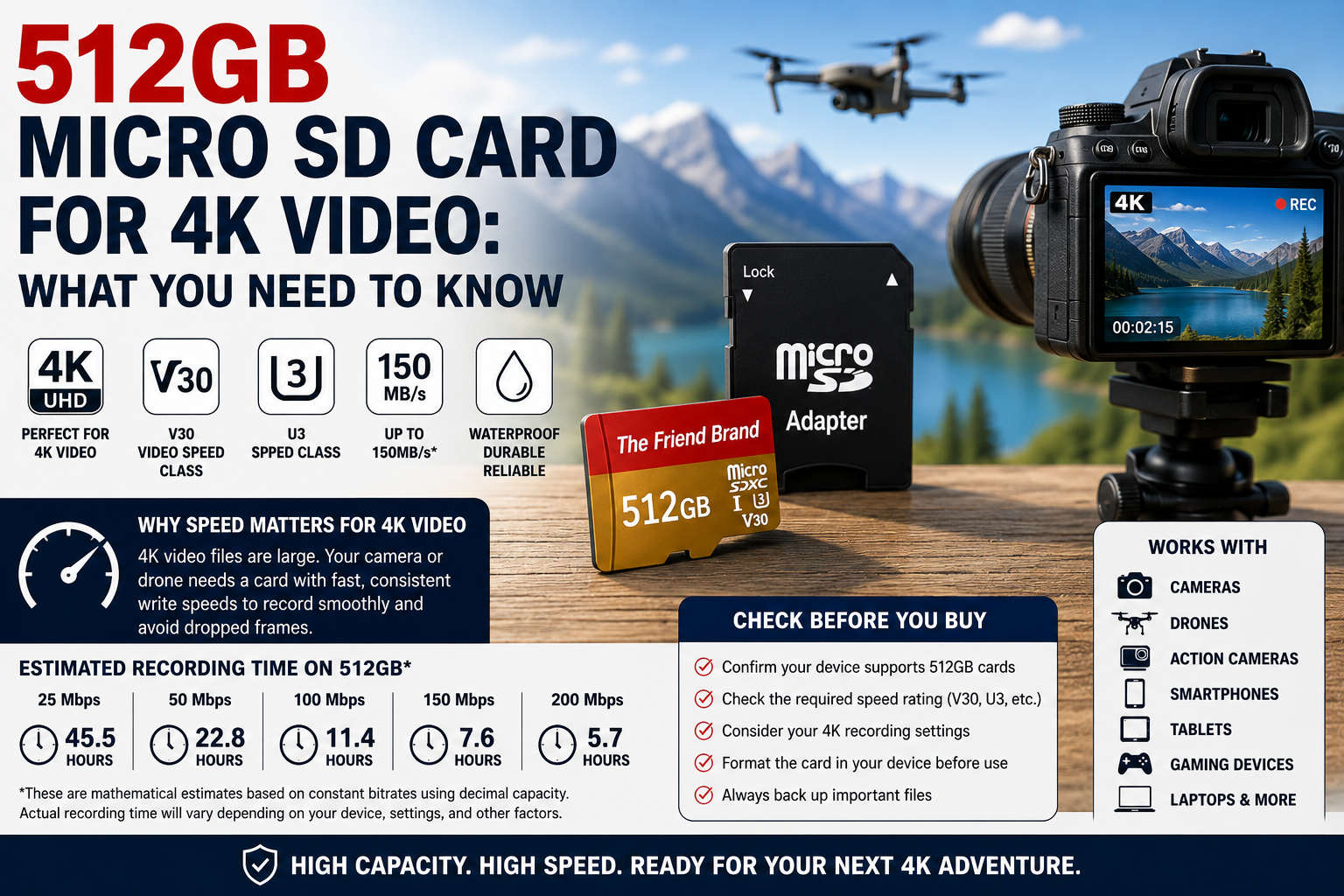
A 512GB micro SD card can be used for 4K video when the recording device supports 512GB cards and the card meets the speed requirements for the selected recording mode. Capacity alone does not determine whether a memory card is suitable for 4K recording.
Before choosing a 512GB micro SD card for 4K video, check the card’s V30, U3, Speed Class and interface specifications along with your camera’s required write speed, bitrate and maximum supported storage capacity. This guide explains what those specifications mean and approximately how much 4K video 512GB can hold.
Can You Use a 512GB Micro SD Card for 4K Video?
Yes, provided your recording device supports a 512GB card and the card meets the device manufacturer’s required speed and performance specifications for the 4K recording mode you plan to use.
The term 4K describes video resolution, but resolution alone does not determine how quickly a camera writes data to a memory card.
Two devices can both record 4K video while using very different bitrates, frame rates, codecs and compression settings. As a result, their micro SD card requirements can also be different.
What Speed Micro SD Card Do You Need for 4K Video?
The required speed depends on the recording device and the specific 4K recording mode.
When recording video, a camera continuously writes data to the memory card. If the card cannot sustain the write performance required by that recording mode, recording may not work properly.
For this reason, do not choose a card based only on its maximum advertised transfer speed. Check the minimum speed rating required by the manufacturer of your camera, drone, action camera or other recording device.
What Does V30 Mean on a Micro SD Card?
V30 is a Video Speed Class rating established by the SD Association.
V30 indicates a minimum sustained sequential write speed of 30 MB/s under the Video Speed Class specification.
The Video Speed Class ratings include:
- V6: minimum 6 MB/s
- V10: minimum 10 MB/s
- V30: minimum 30 MB/s
- V60: minimum 60 MB/s
- V90: minimum 90 MB/s
A V30 rating does not automatically make a card suitable for every 4K recording mode. Some devices and recording settings may require higher performance.
Is V30 Good for 4K Video?
V30 can meet the requirements of some 4K recording modes because it specifies a minimum sustained sequential write speed of 30 MB/s. However, not every 4K camera or recording mode has the same requirements.
Check the specifications for your exact device and recording settings before assuming that V30 is sufficient.
What Does U3 Mean on a Micro SD Card?
U3 belongs to the UHS Speed Class system.
U3 indicates a minimum sequential write speed of 30 MB/s under the UHS Speed Class specification.
You may see both U3 and V30 printed on the same micro SD card. Although they belong to different classification systems, both specify a 30 MB/s minimum write-performance level within their respective standards.
What Does Class 10 Mean?
Class 10 is part of the original SD Speed Class system.
Class 10 indicates a minimum sequential write speed of 10 MB/s.
Modern micro SD cards may display several ratings at the same time, such as Class 10, U3 and V30. Each symbol represents a particular SD speed-class specification.
What Does UHS-I Mean?
UHS-I refers to the card’s Ultra High Speed bus interface.
UHS-I and U3 are not the same specification. UHS-I describes the bus interface, while U3 describes a minimum write-speed classification.
The host device also affects actual performance, so compatibility between the card and device remains important.
What Does “Up to 150MB/s” Mean on a Micro SD Card?
Some micro SD cards advertise transfer speeds using language such as up to 150MB/s.
The phrase up to indicates a maximum advertised transfer speed under applicable conditions. It should not be interpreted as a guaranteed sustained write speed in every device or recording situation.
Actual performance can vary based on factors including:
- The host device
- The card reader
- The interface
- Read versus write operations
- File sizes
- Recording mode
- Formatting
- Other hardware and operating conditions
How Many Hours of Video Can 512GB Hold?
The amount of 4K video that fits on a 512GB micro SD card depends primarily on the recording bitrate, along with factors such as frame rate, codec, compression, audio settings and the recording device.
There is therefore no single recording-time figure that applies to every 4K camera. However, bitrate can be used to calculate useful theoretical estimates.
512GB at 50 Mbps
A 50 megabit-per-second recording uses approximately:
50 ÷ 8 = 6.25 megabytes per second.
Over one hour:
6.25 × 3,600 = 22,500MB per hour.
Using 512,000MB as a simplified decimal representation of 512GB:
512,000 ÷ 22,500 ≈ 22.8 hours.
Therefore, 512GB theoretically represents about 22.8 hours of video at a constant 50 Mbps before accounting for formatting, usable-capacity differences, file-system overhead, variable bitrate and other factors.
512GB at 100 Mbps
At 100 Mbps:
100 ÷ 8 = 12.5MB per second.
12.5 × 3,600 = 45,000MB per hour.
512,000 ÷ 45,000 ≈ 11.4 hours.
That produces a theoretical estimate of approximately 11.4 hours at a constant 100 Mbps before accounting for real-world storage overhead and other variables.
512GB 4K Video Recording Time by Bitrate
Using simplified mathematical estimates, a 512GB card represents approximately:
- 25 Mbps: 45.5 hours
- 50 Mbps: 22.8 hours
- 100 Mbps: 11.4 hours
- 150 Mbps: 7.6 hours
- 200 Mbps: 5.7 hours
These are theoretical estimates, not guaranteed recording times. Actual usable capacity is lower than the advertised 512GB, and recording devices may use variable bitrates, create additional files or reserve storage for other purposes.
Will a 512GB Micro SD Card Work in Every 4K Camera?
No. A 512GB micro SD card will not necessarily work in every 4K camera.
Before purchasing a card, check the official specifications for your exact camera model and confirm:
- Maximum supported card capacity
- Supported card type
- Required file system or formatting procedure
- Minimum speed rating
- Requirements for your chosen 4K recording mode
- Any additional memory-card recommendations from the manufacturer
A card that meets the requirements for one camera’s 4K mode is not automatically appropriate for another camera.
Using a 512GB Micro SD Card in a Drone
Drones can have specific memory-card requirements, particularly when recording high-resolution or high-frame-rate video.
Check the drone manufacturer’s official specifications before choosing a card. Some drones may limit maximum card capacity or require particular speed ratings for specific recording modes.
Using a 512GB Micro SD Card in an Action Camera
Action cameras frequently record high-resolution video for extended periods, making both storage capacity and sustained write performance important.
Verify that your particular action camera supports 512GB cards and check the recommended Video Speed Class or other card requirements for the recording settings you intend to use.
Can You Record 4K Video to a Micro SD Card in a Smartphone or Tablet?
Some smartphones and tablets support expandable micro SD storage, while others do not include a micro SD card slot.
Even when a device supports removable storage, its camera application or operating system may limit whether 4K video can be recorded directly to the memory card.
Check your device manufacturer’s documentation before relying on a micro SD card for 4K recording.
Should You Format a 512GB Micro SD Card Before Recording 4K Video?
Many cameras and recording devices provide a built-in memory-card formatting function.
If the manufacturer recommends formatting the card in the recording device before use, follow that procedure. This helps prepare the card according to the requirements of the device that will use it.
Formatting erases existing data. Always back up files you want to keep before formatting a memory card.
For detailed formatting instructions, see our guide on How to Format a 512GB Micro SD Card.
Choosing a 512GB Micro SD Card for 4K Video
When choosing a micro SD card for 4K video, do not make the decision based on capacity alone. Confirm that the recording device supports 512GB cards and that the card meets the speed requirements for the recording mode you intend to use.
If your device supports the applicable specifications, The Friend Brand offers a 1-Pack 512GB Micro SD Card with Adapter and a 2-Pack 512GB Micro SD Cards.
Review the product specifications and compare them with the requirements published by the manufacturer of your recording device before purchasing or recording important footage.
Frequently Asked Questions About 512GB Micro SD Cards for 4K Video
Is a 512GB micro SD card good for 4K video?
A 512GB micro SD card can provide substantial storage for 4K video, but the device must support that capacity and the card must meet the speed requirements of the selected recording mode.
Is V30 good for 4K video?
V30 specifies a minimum sustained sequential write speed of 30 MB/s. That can meet the requirements of some 4K recording modes, but you should verify the requirements established by the manufacturer of your exact recording device.
Is U3 suitable for 4K video?
U3 specifies a minimum sequential write speed of 30 MB/s under the UHS Speed Class system. Some 4K devices specify U3 as a requirement, but requirements vary by device and recording mode.
How many hours of 4K video can 512GB hold?
It depends on bitrate and other recording settings. Using simplified calculations, 512GB represents about 22.8 hours at 50 Mbps, 11.4 hours at 100 Mbps, 7.6 hours at 150 Mbps or 5.7 hours at 200 Mbps before accounting for usable-capacity differences, overhead and other variables.
Will a 512GB micro SD card work in every 4K camera?
No. Cameras have different maximum-capacity, card-type, speed and formatting requirements. Always check the specifications for your exact camera model.
Is advertised maximum speed the same as sustained write speed?
No. A maximum advertised transfer speed and a minimum sustained write-speed classification describe different performance characteristics. For video recording, pay particular attention to the minimum requirements specified by the recording-device manufacturer.
Should I format a new micro SD card before recording 4K video?
Follow the instructions provided by the manufacturer of your recording device. If the manufacturer recommends formatting the card in the camera or device before recording, use that procedure and remember that formatting erases existing data.
Final Thoughts
A 512GB micro SD card for 4K video can provide substantial recording capacity, but capacity is only one part of choosing the right memory card.
Check your device’s maximum supported capacity, required speed rating, recording bitrate and formatting requirements. Ratings such as V30 and U3 provide useful performance information, but the specifications for your exact recording device should determine which card you use.
If your device supports the applicable specifications, compare The Friend Brand’s 1-Pack 512GB Micro SD Card and 2-Pack 512GB Micro SD Cards to choose the package that fits your storage needs.
[…] If you are choosing storage specifically for 4K recording, see our detailed guide to 512GB Micro SD Cards for 4K Video. […]
[…] For a deeper explanation, see our guide to 512GB Micro SD Cards for 4K Video. […]